
SQL Server AG Patching with Ansible: Tasks
Jun 10, 2025

In my last post, we defined the prerequisites needed for patching. Before applying the patch, we need to make sure the variables are set and that we're dealing with a healthy AG. With those out of the way, we're ready to build out the remaining tasks.
- tasks/cleanup.yml
- tasks/failback.yml
- files/failback_ag.ps1
- tasks/failover.yml
- files/failover_ag.ps1
- tasks/patch_secondaries.yml
- files/change_failover_mode.ps1
- tasks/main.yml(We'll complete the file by adding the additional tasks.)
- playbook_patchSqlAG.yml(playbook to execute the role)
By the end of this post, you'll have all the required files to build the sql_ag_patch role. We'll also complete the tasks/main.yml file that we started during the last post.
tasks/cleanup.yml
During the install, we copy the update exe and the SqlServer PowerShell module to each managed node. This set of tasks will remove both of those.
---
- name: Delete source files
  ansible.windows.win_file:
    path: "{{ sql_patch_temp_folder }}"
    state: absent

- name: Remove SqlServer modules
  ansible.windows.win_file:
    path: "C:\\Program Files\\WindowsPowerShell\\Modules\\SqlServer"
    state: absent
  when:
    - remove_sqlserver_module
tasks/failback.yml
This file is used to initiate a fallback of the AG (if specified). It uses the ansible.windows.win_powershell module to execute the failback_ag.ps1 script.
---
- name: Failover AG from the primary back to the original primary
  ansible.windows.win_powershell:
    script: "{{ lookup('file', 'failback_ag.ps1') }}"
    parameters:
      AgCurrentPrimary: "{{ ag_current_primary }}"
      AgName: "{{ ag_name }}"
      DesiredSqlVersion: "{{ desired_sql_version }}"
      NewPrimary: "{{ new_primary }}"
  register: failback_result

- name: Debug failback
  ansible.builtin.debug:
    msg: "{{ failback_result }}"
files/failback_ag.ps1
The following script performs the failback process to the original primary replica. It's designed to safely switch database roles between primary and secondary replicas.
[CmdletBinding()]
param (
  [Parameter(Mandatory = $true)]
  [string]$AgCurrentPrimary,

  [Parameter(Mandatory = $true)]
  [string]$AgName,

  [Parameter(Mandatory = $true)]
  [string]$DesiredSqlVersion,

  [Parameter(Mandatory = $true)]
  [string]$NewPrimary
)
Import-Module SqlServer
# Log the input parameters
Write-Output "AgCurrentPrimary: '$AgCurrentPrimary'"
Write-Output "NewPrimary: '$NewPrimary'"
Write-Output "AgName: '$AgName'"
Write-Output "DesiredSqlVersion: '$DesiredSqlVersion'"

# Build the Replica name for a default vs. named instance
if ($AgCurrentPrimary -like '*\*') {
  $Replica = $AgCurrentPrimary
}
else {
  $Replica = "$AgCurrentPrimary\DEFAULT"
}
# Encode the replica name if it's a named instance
$EncodedSqlName = ConvertTo-EncodedSqlName -SqlName $AgCurrentPrimary

try {
  $actualVersion = (Get-SqlInstance -ServerInstance $AgCurrentPrimary -ErrorAction Stop).Version.ToString()
  $state = (Test-SqlAvailabilityReplica `
   -Path "SQLSERVER:\Sql\$Replica\AvailabilityGroups\$AgName\AvailabilityReplicas\$EncodedSqlName" -ErrorAction Stop).HealthState
}
catch {
  Write-Warning "Failed to retrieve health state for replica $Replica. Unable to fail back."
  $Ansible.Failed = $true
  return
}

Write-Output "Current primary replica: '$AgCurrentPrimary'"
Write-Output "Replica state: '$state' / Version: '$actualVersion'"

# If version and health are as expected, fail over
if ($actualVersion -eq $DesiredSqlVersion -and $state -eq 'Healthy') {
  Write-Output "Failing over AG '$AgName' from '$NewPrimary' to '$AgCurrentPrimary'..."
  Switch-SqlAvailabilityGroup -Path "SQLSERVER:\Sql\$Replica\AvailabilityGroups\$AgName" -ErrorAction Stop
  $Ansible.Changed = $true
}
else {
  Write-Host "No failover performed. Either version or health state does not match."
  $Ansible.Failed = $true
 }
tasks/failover.yml
This file follows a similar pattern as failback.yml. We're leveraging Ansible's windows.win_powershell module to execute the failover.ps1 script. However, before doing so, we use the builtin.set_fact module to create a two new facts; ps_path_ag_primary and new_primary. The new_primary fact is used later to determine which replica became the new primary after the failover was performed.
---
# failover only if the primary requires the updates

- name: Set PowerShell path fact for the primary
  ansible.builtin.set_fact:
    ps_path_ag_primary: "SQLSERVER:\\Sql\\{% if 'DEFAULT' in sql_instance_name %}{{ ansible_hostname }}\\{{ sql_instance_name }}{% else %}{{ server_instance }}{%
      endif %}\\AvailabilityGroups\\{{  ag_name }}\\AvailabilityReplicas"

# - name: Return ps_path_ag_primary fact
#   ansible.builtin.debug:
#     msg: "{{ ps_path_ag_primary }}"

- name: Failover AG from the current primary to a patched synchronous secondary
  ansible.windows.win_powershell:
    script: "{{ lookup('file', 'failover_ag.ps1') }}"
    parameters:
      PsPathAgPrimary: "{{ ps_path_ag_primary }}"
      DesiredSqlVersion: "{{ desired_sql_version }}"
      AgName: "{{ ag_name }}"
  register: failover_result

# - name: Return failover result
#   ansible.builtin.debug:
#     msg: "{{ failover_result }}"

- name: Set new primary fact
  ansible.builtin.set_fact:
    new_primary: "{{ failover_result.host_out | trim }}"
files/failover.ps1
This script finds and fails over to a suitable secondary replica. It searches for replicas that are synchronous, secondary, and synchronized, then checks each one to ensure it matches the desired SQL Server version. Once it finds the first replica meeting all criteria (synchronous commit mode, secondary role, synchronized state, and correct version), it performs the failover to that replica and outputs the new primary server name. The script handles both default and named SQL Server instances and sets appropriate status variables and exits after the failover.
[CmdletBinding()]
      param(
        [Parameter(Mandatory=$true)]
        [string]$PsPathAgPrimary,

        [Parameter(Mandatory=$true)]
        [string]$DesiredSqlVersion,

        [Parameter(Mandatory=$true)]
        [string]$AgName
      )
      Import-Module SqlServer

      # Log the input parameters
      Write-Output "PsPathAgPrimary: '$PsPathAgPrimary'"
      Write-Output "DesiredSqlVersion: '$DesiredSqlVersion'"
      Write-Output "AgName: '$AgName'"


      # Find replicas that are synchronous, secondary, and synchronized
      $Replicas = Get-ChildItem $PsPathAgPrimary |
        Where-Object {
          $_.AvailabilityMode -eq "SynchronousCommit" -and
          $_.Role -eq "Secondary" -and
          $_.RollupSynchronizationState -eq "Synchronized"
        }

      foreach ($replica in $Replicas) {
        try {
          $actualVersion = (Get-SqlInstance -ServerInstance $replica.Name -ErrorAction Stop).Version.ToString()
        }
        catch {
          # If retrieving version fails, skip this replica
          continue
        }

        # Check if the replica is at the desired SQL version
        if ($actualVersion -ne $DesiredSqlVersion) {
          Write-Output "Actual version '$actualVersion' does not match the desired version '$DesiredSqlVersion'."
          $Ansible.Failed = $true
          return
          }

        # Since the version matches, handle default vs. named instance for the new primary path
        if ($replica.Name -like '*\*') {
          $newPrimary = $replica.Name
        }
        else {
          $newPrimary = "$($replica.Name)\DEFAULT"
        }


         # Write-Host "Failing over AG '$AgName' to replica: $($replica.Name)"
          Switch-SqlAvailabilityGroup -Path "SQLSERVER:\Sql\$newPrimary\AvailabilityGroups\$AgName" -ErrorAction Stop

          # Return the new primary replica name in stdout
          write-host $newPrimary
          $Ansible.Changed = $true

          # Exit after the first suitable replica is found and the failover is done
          return
    }
tasks/patch_secondaries.yml
This file manages the patching process for all secondary replicas. It only runs when patching is needed (is_patch_needed is true) and follows a structured approach: first changing the secondary replica's failover mode to manual to prevent automatic failover during patching, then installing SQL updates, optionally rebooting the server, waiting for SQL Server to become available again, and finally restoring the failover mode back to automatic if it was previously changed. The process ensures the secondary replicas can be safely patched without disrupting the availability group's automatic failover capabilities. To do: A future version of this file will include a check for a pending reboot of the target server.
---
# We need to connect to the primary replica to set this secondary to manual failover

- name: Patch secondary replicas block - only run if version mismatch
  when:
    - is_patch_needed
  block:
    - name: Change secondary replica failover mode to manual
      ansible.windows.win_powershell:
        script: "{{ lookup('file', 'change_failover_mode.ps1') }}"
        parameters:
          SqlInstanceName: "{{ sql_instance_name }}"
          AgName: "{{ ag_name }}"
          AgCurrentPrimary: "{{ ag_current_primary }}"
          NewPrimary: "{{ new_primary }}" # If the primary has changed, we'll need to connect to it vs AgCurrentPrimary
          HostName: "{{ ansible_hostname }}"
          TargetMode: "Manual" # Use "Manual" or "Automatic" as needed
      register: change_failover_result

    # - name: Return change failover type result
    #   ansible.builtin.debug:
    #     msg: "{{ change_failover_result }}"

    # CHECK FOR PENDING REBOOT

    - name: Install SQL Updates on secondaries
      ansible.windows.win_command:
        cmd: "{{ sql_patch_temp_folder }}updates\\{{ sql_patch_filename }} {{ sql_patch_args }} "
      register: patch_out
      failed_when: "'FAILED' in patch_out.stderr"

    - name: Reboot
      ansible.windows.win_reboot:
        reboot_timeout: "{{ sql_reboot_timeout }}"
      when:
        - reboot_secondary

    - name: Wait for SQL Server to become available.
      ansible.windows.win_wait_for:
        port: "{{ sql_port }}"
        delay: 10
        timeout: 600

    - name: Change secondary replica failover mode to automatic if changed previously
      ansible.windows.win_powershell:
        script: "{{ lookup('file', 'change_failover_mode.ps1') }}"
        parameters:
          SqlInstanceName: "{{ sql_instance_name }}"
          AgName: "{{ ag_name }}"
          AgCurrentPrimary: "{{ ag_current_primary }}"
          NewPrimary: "{{ new_primary }}" # If the primary has changed, we'll need to connect to it vs AgCurrentPrimary
          HostName: "{{ ansible_hostname }}"
          TargetMode: "Automatic" # Use "Manual" or "Automatic" as needed
      when: change_failover_result.changed
files/change_failover_mode.ps1
This script changes the failover mode of a secondary replica. It takes parameters of the SQL instance, AG name, current and new primary servers, hostname, and target failover mode (Manual or Automatic). The script intelligently determines which primary server to connect to, constructs the proper PowerShell paths for both primary and secondary replicas (handling default vs named instances), verifies it's connecting to the actual primary replica, locates the target secondary replica, and then changes its failover mode only if it differs from the current setting. It includes validation to ensure it's working with the correct replicas before making changes.
[CmdletBinding()]
param(
    [Parameter(Mandatory=$true)]
    [string]$SqlInstanceName,

    [Parameter(Mandatory=$true)]
    [string]$AgName,

    [Parameter(Mandatory=$true)]
    [string]$AgCurrentPrimary,

    [Parameter(Mandatory=$true)]
    [string]$NewPrimary,

    [Parameter(Mandatory=$true)]
    [string]$HostName,

    [Parameter(Mandatory=$true)]
    [ValidateSet("Manual", "Automatic")]
    [string]$TargetMode
)

# Import the SQL Server module
Import-Module SqlServer -ErrorAction Stop

# Determine which primary to use: if $NewPrimary has been updated from its default value, use it; otherwise, use $AgCurrentPrimary.
if ($NewPrimary -and $NewPrimary -ne "default_value") {
    $primaryCandidate = $NewPrimary
} else {
    $primaryCandidate = $AgCurrentPrimary
}

# Build the Primary replica name based on whether it's a default or named instance.
if ($primaryCandidate -like '*\*') {
    $PrimaryReplica = $primaryCandidate
} else {
    $PrimaryReplica = "$primaryCandidate\DEFAULT"
}

Write-Output "Using primary replica: $PrimaryReplica"

# Build the Secondary replica name for a default vs. named instance.
# For named instances, use ConvertTo-EncodedSqlName.
if ($SqlInstanceName -eq 'DEFAULT') {
    $SecondaryReplica = $HostName
} else {
    $SecondaryReplica = ConvertTo-EncodedSqlName -SqlName "$HostName\$SqlInstanceName"
}

# Set the PowerShell provider path using the chosen primary replica.
$PrimaryPSPath = "SQLSERVER:\Sql\$PrimaryReplica\AvailabilityGroups\$AgName\AvailabilityReplicas\"

# Verify that this path is connected to the primary replica by checking for an object with Role "Primary"
$agReplicas = Get-ChildItem $PrimaryPSPath
$primaryReplicaObject = $agReplicas | Where-Object { $_.Role -eq "Primary" }
if ($null -eq $primaryReplicaObject) {
    Write-Output "The path $PrimaryPSPath does not appear to be connected to the primary replica."
    $Ansible.Failed = $true
    return
}

# Retrieve the secondary replica object based on its display name.
$replica = $agReplicas | Where-Object { $_.DisplayName -eq $SecondaryReplica }
if ($null -eq $replica) {
    Write-Output "Replica $SecondaryReplica not found at path $PrimaryPSPath"
    $Ansible.Failed = $true
    return
}

# If the replica's current failover mode is not the target, update it.
if ($replica.FailoverMode -ne $TargetMode) {
    Set-SqlAvailabilityReplica -Path $replica.PSPath -FailoverMode $TargetMode
    Write-Output "Replica $SecondaryReplica failover mode changed to $TargetMode."
    $Ansible.Changed = $true
} else {
    Write-Output "Replica $SecondaryReplica is already set to $TargetMode. No changes made."
    $Ansible.Changed = $false
}
tasks/main.yml
And finally, you can complete the main.yml file. This file orchestrates the complete SQL Server Always On Availability Group patching process. First, it runs prerequisites and identifies the primary node, then validates the AG health before patching. For secondary replicas, it applies patches directly when needed. For primary replicas requiring patches, it performs a more complex process - failing over to a secondary, patching the former primary (now secondary), and optionally failing back to the original primary if configured. The process concludes with the final AG validation and cleanup of temporary files. The workflow handles different server roles and only performs operations when patching is actually needed, ensuring minimal disruption to the availability group.
---
# tasks file for sql_ag_patch
- name: Prerequisites
  ansible.builtin.include_tasks: prerequisites.yml
  tags: prereq

- name: Identify Primary node
  ansible.builtin.include_tasks: identify_primary.yml
  tags: get_primary

- name: Return primary node
  ansible.builtin.debug:
    msg: "{{ ag_current_primary }}"

- name: Check fact server_instance
  ansible.builtin.debug:
    msg: "{{ server_instance }}"

- name: Validate AG health state prior to installing updates
  ansible.builtin.include_tasks: validate.yml
  vars:
    post_validation: false
  when:
    - ag_current_primary == server_instance

- name: Patch secondaries
  ansible.builtin.include_tasks: patch_secondaries.yml
  when:
    - ag_current_primary != server_instance
    - is_patch_needed
  tags: patch_secondary

# - name: Check vars hostname
#   ansible.builtin.debug:
#     msg: "{{ ansible_hostname }}"

# - name: Check vars ag_name
#   ansible.builtin.debug:
#     msg: "{{ ag_name }}"

# Only failover and failback if the primary needs to be updated.
- name: Patch primary if required
  when:
    - ag_current_primary == server_instance
    - is_patch_needed
  block:
    - name: Failover to new primary
      ansible.builtin.include_tasks: failover.yml

    - name: Check fact new primary
      ansible.builtin.debug:
        msg: "{{ new_primary }}"

    - name: Patch former primary
      ansible.builtin.include_tasks: patch_secondaries.yml

    - name: Failback to the original primary
      ansible.builtin.include_tasks: failback.yml
      when:
        - sql_ag_failback

- name: Validate final state of AG
  ansible.builtin.include_tasks: validate.yml
  vars:
    post_validation: true

- name: Cleanup files
  ansible.builtin.include_tasks: cleanup.yml
  when:
    - current_sql_version == desired_sql_version
playbook_patchSqlAG.yml
We can't forget the playbook that imports the sql_ag_patch role and then executes it. To patch each secondary individually be sure to uncomment serial: 1.
---
- name: Patch SQL Server Availability Group
  hosts: sqlservers
  gather_facts: true
  any_errors_fatal: true
  # serial: 1
  # debugger: always

  tasks:
    - name: Import the sql_ag_patch role
      ansible.builtin.import_role:
        name: sql_ag_patch
Conclusion
We've now completed the sql_ag_patch Ansible role that automates the entire SQL Server Always On Availability Group patching process. From the initial prerequisites and health validation to the coordinated failover, patching, and fallback operations. This role provides a robust example of the level of automation DBAs can achieve with Ansible.
The role we've built handles the complexities that make AG patching challenging: intelligent replica selection, proper failover mode management, version validation, and comprehensive error handling. By automating these processes, we've eliminated the manual steps that often lead to human error during maintenance windows.
Key benefits of this approach include:
- Consistency and Reliability- Every patching operation follows the same validated process, reducing the risk of configuration drift or missed steps that can occur with manual procedures.
- Reduced Downtime- The automated failover and fallback processes minimize the time your instances spend in transitional states.
- Enhanced Safety- Built-in health checks and version validations ensure patches are only applied when conditions are optimal, preventing potentially disruptive operations.
- Scalability- Whether you're managing a single AG or dozens across multiple environments, the same role can be deployed consistently across your infrastructure.
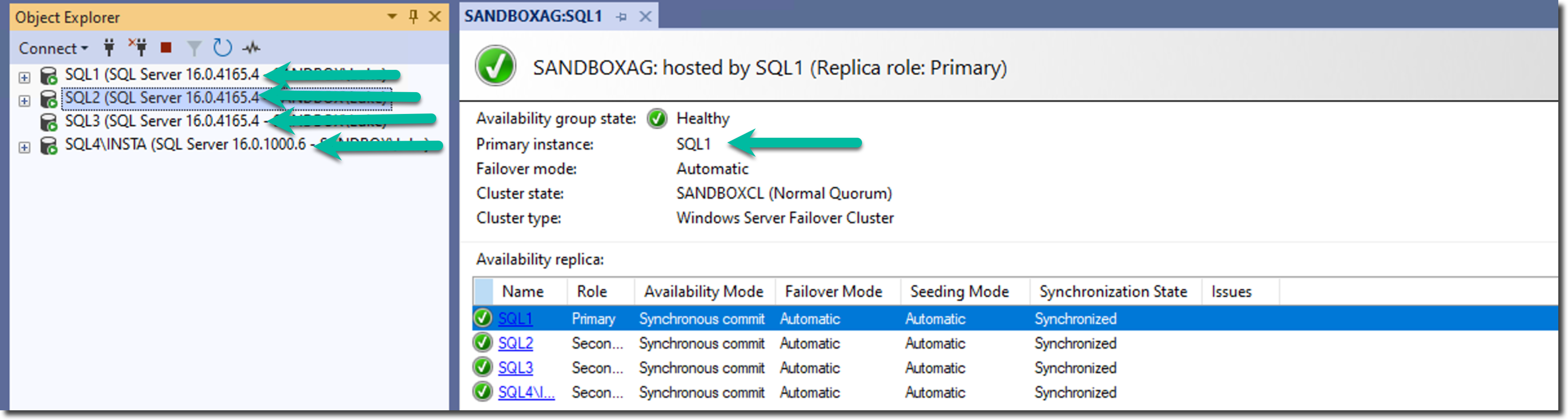
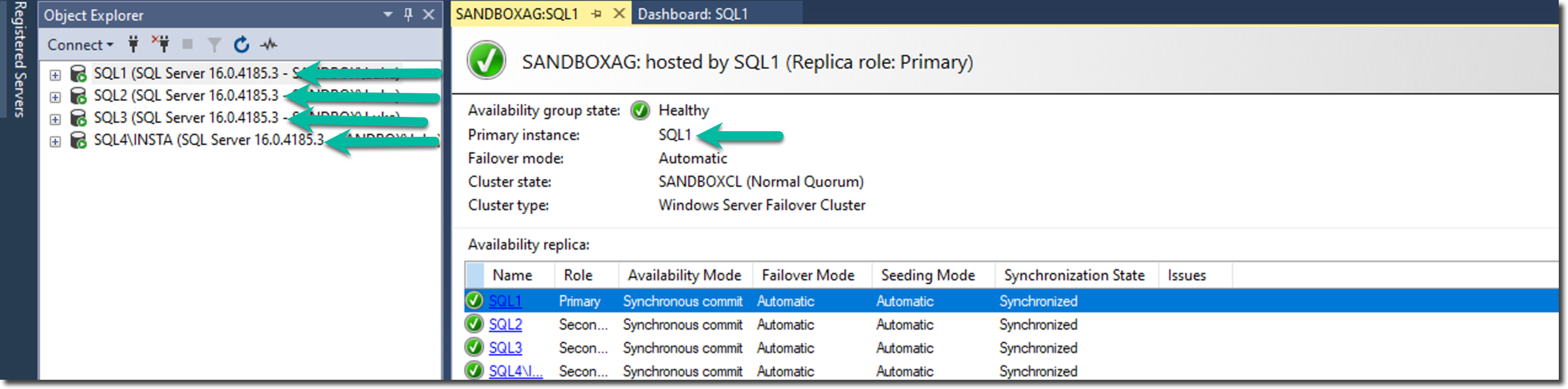
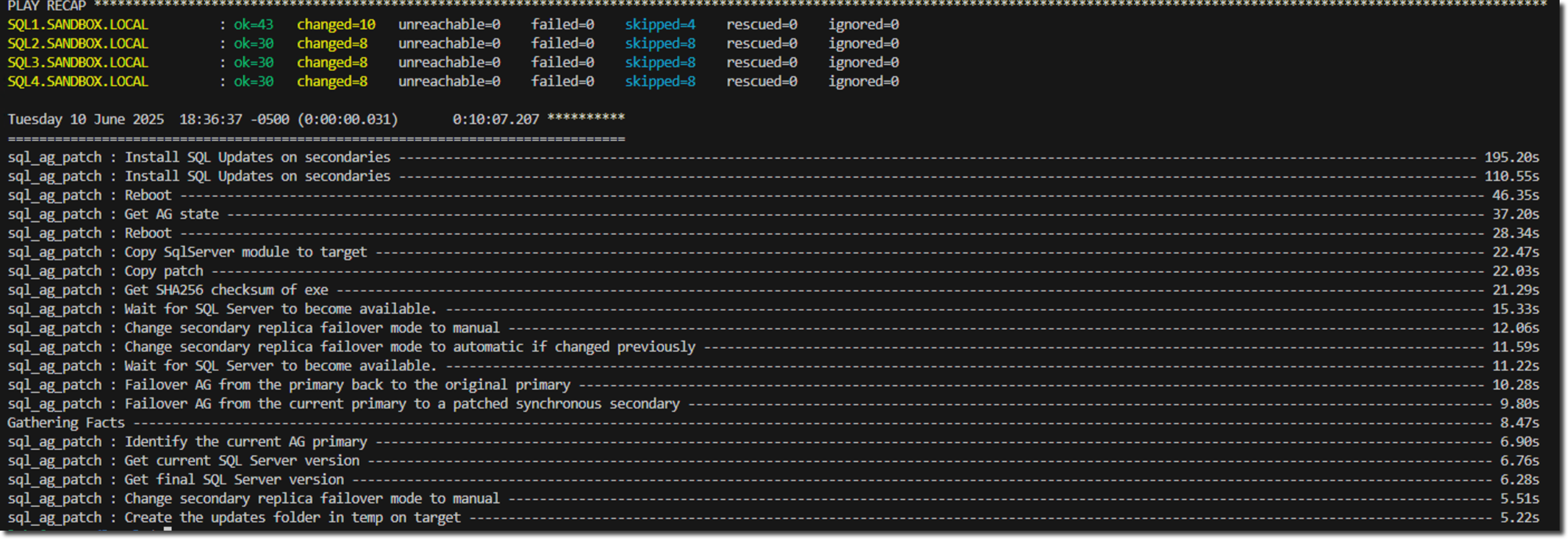
This series has taken you from understanding the prerequisites through building each component of an example patching solution. In an upcoming video, I'll walk through executing this role against the SQL Server environment shown in the screenshot below. This will show it in action, and I'll highlight the capabilities that make this approach so valuable to enterprise SQL Server DBAs.
Before
After
Play Recap
Previous ← SQL Server AG Patching with Ansible: Prerequisites
LinkedIn YouTube Newsletter
The Database Platform Automation Roadmap
Move from checklists and scattered scripts to desired-state Ansible playbooks—so you can stop wondering whether production still matches what you built. Includes the 60-second self-audit and 23-page field guide (PDF).